This is a private website for students of the
Spring 2017 CBC Six Month Online Novel Writing Course
You must be Logged In to Read, Post or Comment!
X
This page is designed to show you (not tell you!) how to Post to this Share Space.
1.
• If you are not already logged in…
Click the Log In on the Menu Bar.
Log in using your User Name and Password.
• If you are logged in…
Mouse over the ‘Review/Rewrite/Rethink’ title at top left of screen.
Click ‘Dashboard’ in the drop-down menu that appears.
2.
Click on Posts > Add New in the menu on the left hand side of the ‘Dashboard’ Page. A new, Blank Post Creation Page will appear.
3.
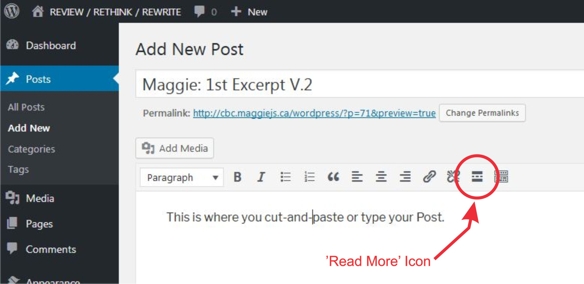
Type your First Name, Title and Version Number into the Title Box.
Cut-and-paste or type your post text into the large Box below.
At the end of your first paragraph of text, set your cursor. Then, click on the ‘Read More’ icon in the toolbar. This will create a first-paragraph excerpt of your post for the front page of the Latest Rewrites section.
4.
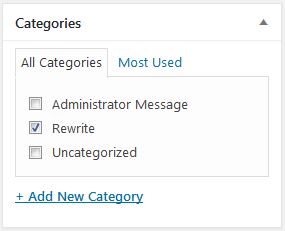
In the Categories Box, lower Right of Screen, click on ‘Rewrite’
5.
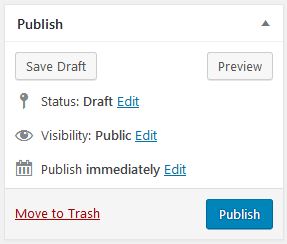
In the Publish Box, upper Right of Screen, click ‘Publish’.
6.
That’s it!